Request and approve job access
How Members ask for teammates to be added to a job, and how Admins approve or refuse.
4 min read
A member requests job access for a teammate
Priya, a recruiter, is working on the "Data Analyst" job in Recruiter OS and needs her colleague Alex added.
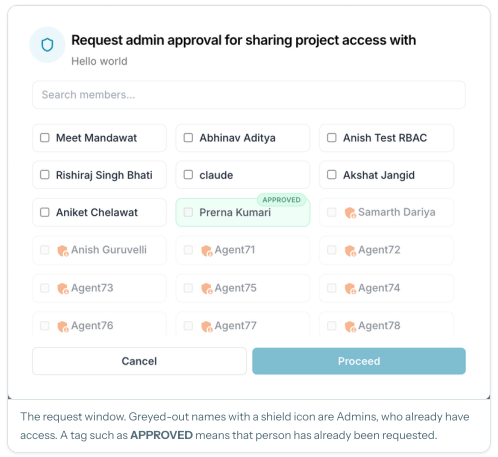
- 1Priya asks (Member)1. Recruiter OS -> Active Jobs. 2. On the Data Analyst card: ⋮ -> Access control. 3. Tick Alex and click Proceed. Message: "Access request has been shared to the Admin over Email." The request window. Greyed-out names with a shield icon are Admins, who already have access. A tag such as APPROVED means that person has already been requested. Workspace Admins receive an email: "Project access request for Data Analyst", with a link to review.
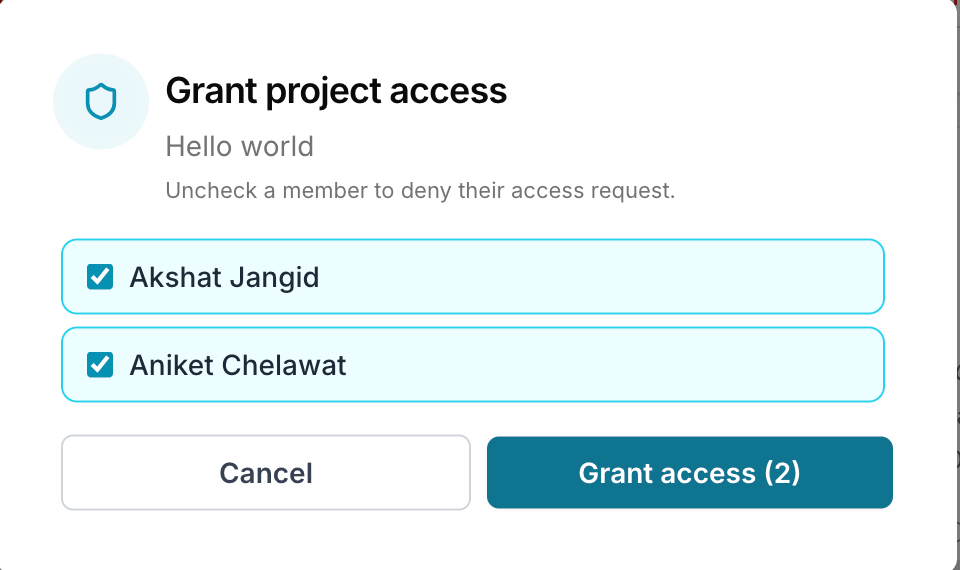
- 2Approve (Admin / approver)1. Recruiter OS -> Active Jobs. The card shows a shield badge with the number of people waiting. 2. ⋮ -> Grant Access. Everyone requested is ticked. Untick anyone you want to refuse. 3. Click Grant access (n), where n is the number of people you're approving. Grant project access. Untick anyone you want to refuse, then click Grant access.